
CityCAD 2.2 released with new data import engine
September 23, 2011
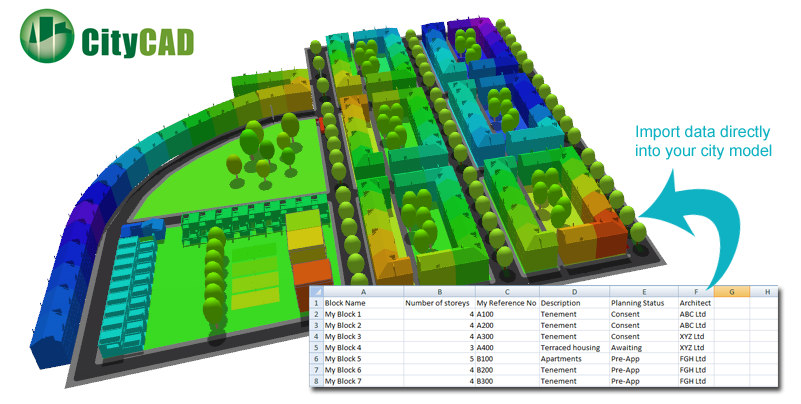
Holistic City Software has released CityCAD 2.2 with a new data import engine and improved 2d drawings, as well as several new features and further improvements in stability and performance.
CityCAD 2.2 - new data import feature
Import data directly into your city model
The new data import feature is a key step in our longer term programme to extend interoperability with other software tools.
You can now import a CSV file or Excel spreadsheet, and automatically create custom parameters for elements in your model from the data. You can update existing parameters or create new ones as part of the import process.
The data import feature can also directly edit a number of CityCAD properties - for example if you have a spreadsheet with block names and number of storeys, this can be used to set the heights of the buildings in your CityCAD model. Densities, unit sizes, energy use and other parameters can also be updated automatically.
2D plan diagrams
We have improved the 2D Plan Diagram window, and you can now shade blocks, city items and routes separately. The new distance, liveability and custom parameter shading, which is already available in the 3D view, has been extended to the 2D view.
Perimeter objects, such as house models on semi-detached/detached housing blocks, can now be shaded separately to provide extra analysis and more descriptive figure-ground diagrams.
Image: https://web.archive.org/web/20120322105716im_/http://www.holisticcity.co.uk/images/stories/Solutions/pressinfo/citycad_figureground_perimeterobjects.png
Specify unit density when editing land use subdivisions
When editing land use subdivisions in mixed-use blocks or city items, you can now specify a 'unit density' for each one, and this will automatically set the number of units
Miscellaneous other minor improvements
- The data export system has been improved 'under the hood' so you can now export your data to XLS format without needing to have Excel installed on your PC.
- Shading has been improved, and we have introduced a new 'High Rise' option when shading by number of storeys, to improve legibility when there are many tall buildings.
- New 'Purge Unused' button makes it easy to clear the File DXF Library of DXF City Items that are not used in your current CityCAD model.
- New keyboard shortcuts to set snaps to default or narrow range.
As with all of our new releases, we have fixed known bugs and improved the speed and performance of CityCAD wherever possible. We have a policy of fixing reproduceable bugs as soon as possible after they are detected, and so please contact us at support@holisticcity.co.uk if you experience any problems.