
Urban Design Analysis Made Simple in CityCAD 1.6
January 22, 2009
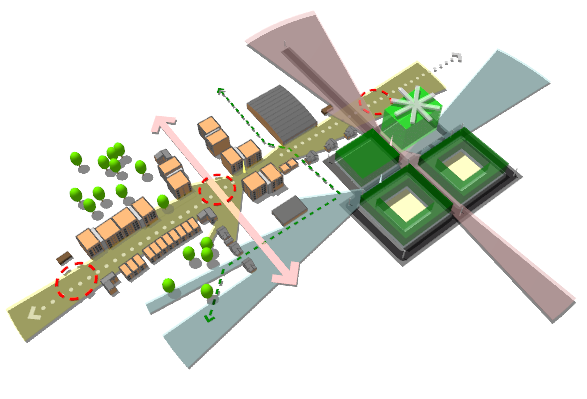
Holistic City Software has released CityCAD 1.6, the latest version of the urban design software tool, which includes new features and graphics capabilities making it easier and quicker than ever before to create and study urban masterplan options.

Illustrate your Model with Graphics
You can now quickly add a range of urban design graphics to your 3D models including circular placemarks, arrows and 'landmark' stars. Express important features in your masterplan such as key buildings, areas for improvement or movement routes and views.
You can now also draw Isovists - click at your selected viewpoint in the model and the approximate field of view will be displayed. You can use this to test what can be seen from where, and get a better sense of the legibility of your masterplan.
New Features
CityCAD 1.6 also features several minor bug fixes, performance enhancements and usability improvements. There is now an Autosave, a new filter on the select tool (allowing you to select only specific parts of a model), a zoom extents and a zoom window tool. See full list of new features.
Save Time while Protecting Design Quality
CityCAD 1.6 has kept all of the core CIM (City Information Modelling) features which help to analyse and understand complex urban design models very quickly. A large number of masterplanning scenarios can be created and tested in little time, reducing project costs and making it possible to evolve and refine a design much further than was possible before.
CityCAD 1.6 - Full List of Improvements / New Features
- New Graphics Object Tool for creating arrows, landmarks, placemarks and isovists.
- Graphics Object Manager for deleting, selecting graphics objects.
- Automatic Backup Save - intervals and number of backup files can be set manually.
- Zoom Window
- Zoom Extents
- Filter for Select Tool - can select only specific kinds of elements
- Additional currencies added to custom unit system at user request
- Several minor usability improvements and performance enhancements
(Full List of Improvements / New Features since CityCAD 1.1)
- Custom Land Use Library
- Saved View Library
- 3D DXF CAD model library - can be assigned to City Items
- Enhanced City Item Properties - can specify an area and add Land Use Subdivisions (eg. as per Mixed-Use Blocks)
- Building Sculpting - if you select 'None' land use in a Building Floor or Subdivision, it will disappear from the model and its floor area will no longer be calculated in the City Grid. You can use this to 'sculpt' more complex building and block forms.
- Apply City Defaults to several elements at a time (eg. you can select all elements in a neighbourhood group and apply settings)
- New 'Move To...' feature - you can move elements to exact coordinates or by exact vectors.
- Additional outputs in City Grid - Approximate Building Envelope, Building Volume and Approximate Surface-Volume ratio
- Redesigned DXF Import Window - base maps, city items and DXF-URB now organized in separate tabs.
- When importing DXF lines and converting them into CityCAD Routes, you can now specify route and block type from within the DXF Import window.
- Redesigned Land Use Preferences Dialog.
- Miscellaneous minor bug fixes and performance optimizations
- Export to KML format